Surface Registration
Perform surface-based registration to align a moving model with a fixed model.
- The Surface Registration tool allows users to preview the alignment and then accurately align a moving model to a fixed (static) model by computing and applying a surface registration transform.
Steps:
- Click on the
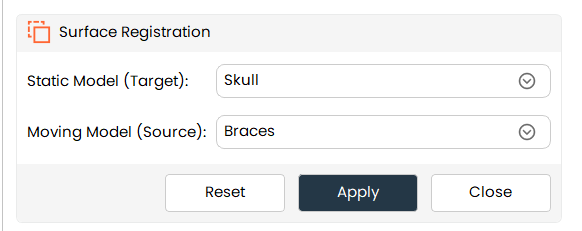
Surface Registrationbutton from the tools panel. - The Surface Registration panel opens.
- The selected model is automatically set as the Static Model (Target).
- Select a Moving Model (Source) from the combo box.
- Click Preview to visualize the alignment result.
- Click Apply to finalize the registration.
Additional Information
Model Selection Behavior
-
If only one model is present in the scene:
-
The Moving Model combo box will show None.
-
The Apply button will be disabled.
-
Preview
- Clicking Preview:
- Computes the surface registration temporarily.
- Displays a preview of how the moving model will align to the fixed model.
- The original model position is not permanently changed.
Apply
- Clicking Apply:
- Creates a Transform Node.
- Computes surface registration between the static and moving models.
- Applies the computed transform to the moving model.
- The moving model is permanently aligned to the fixed model’s position.